
Introduction
If your organization runs WebFOCUS, you have almost certainly heard the term “Reporting Server” thrown around, but the details of how it actually works often remain fuzzy outside the server administration team. That fuzziness becomes a real problem when you are troubleshooting performance, planning a migration, or trying to explain infrastructure costs to leadership.
The WebFOCUS Reporting Server is not a single monolithic service. It is a layered, distributed architecture built around a clear separation of concerns: request handling, data access, and output generation each live in distinct components. Understanding how these pieces interact is essential for anyone managing, extending, or eventually migrating off a WebFOCUS environment.
This post breaks down the full architecture in plain technical terms.
The Two Core Components: Client and Reporting Server
WebFOCUS splits its core processing responsibilities between two primary components.
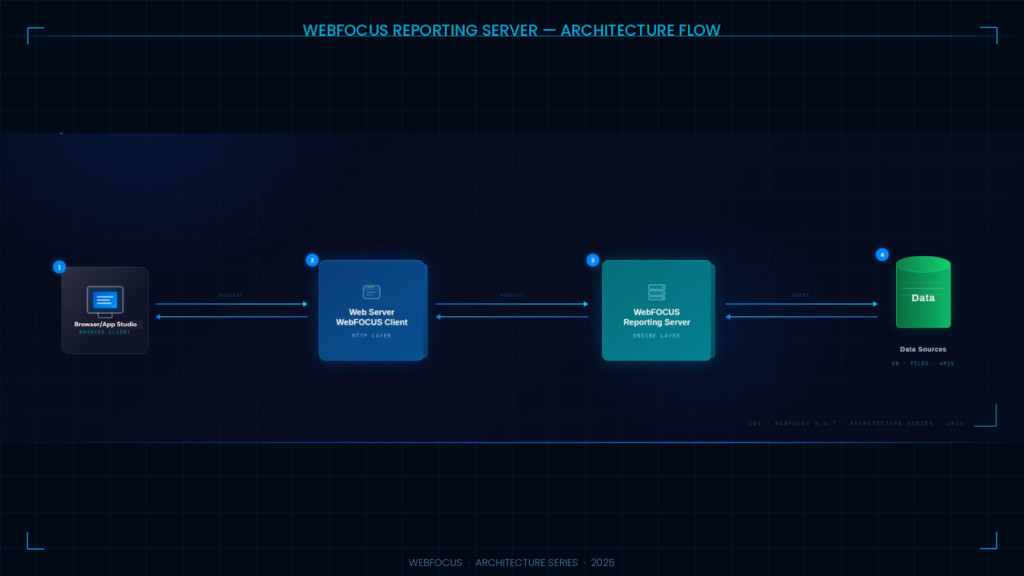
The WebFOCUS Client sits on the web or application server tier. Implemented as Java servlets, the Client acts as the traffic controller for the entire platform. When a user triggers a report from a browser, from App Studio, or from a deployed application, the request hits the WebFOCUS Client first. The Client receives and parses the incoming request, resolves parameters and variables, and constructs a properly formatted instruction packet to send downstream. It does not process reports itself, and it does not touch data. Its job is orchestration.
The WebFOCUS Reporting Server does the actual heavy lifting. It receives requests from the Client, opens agent processes to execute report procedures, issues queries against data sources, compiles answer sets, formats output (HTML, PDF, Excel, and others), and returns the result to the Client for delivery to the browser.
Critically, these two components do not have to live on the same machine. WebFOCUS uses a distributed architecture, meaning the Client can sit on one server while one or more Reporting Servers operate on entirely separate machines, potentially on different operating systems. A WebFOCUS Client can connect to multiple Reporting Servers simultaneously, and reports can span data from all of them.
How a Report Request Flows Through the Architecture
Understanding the request lifecycle removes a lot of the mystery around performance troubleshooting and capacity planning. Here is the sequence for a standard report execution:
- A user requests a report by clicking a link or submitting a form in a browser, or by executing a procedure from App Studio.
- The web server receives the HTTP request and passes it to the WebFOCUS Client servlet.
- The WebFOCUS Client processes the incoming parameters and builds a request packet for the Reporting Server.
- The Reporting Server receives the request and opens an agent process dedicated to that execution.
- The agent locates and executes the report procedure (a .fex file stored on the server).
- The procedure issues a data request. If the data source is local to the Reporting Server, it is accessed directly. If the data resides on a remote platform, the request passes through an optional sub-server.
- The Reporting Server compiles the answer set returned from the data source.
- The Reporting Server formats the result in the requested output format.
- Formatted output is returned to the WebFOCUS Client.
- The Client passes the output back to the browser for rendering.
Each agent process handles exactly one request at a time. The number of concurrent agents running on a Reporting Server directly determines how many simultaneous users the environment can serve, which is one of the key capacity levers administrators control through configuration.
Listeners, Agents, and Services: The Internal Engine
Inside the Reporting Server, several subsystems coordinate request processing.
TCP and HTTP Listeners handle inbound connections. By default, the TCP Listener uses port 8120, with the HTTP Listener assigned to 8121. These ports are configurable during installation, and environments with multiple Reporting Server instances on the same machine require distinct, non-overlapping port ranges for each instance.
Data Access Agents are the worker processes that execute report procedures and retrieve data. The Reporting Server spawns these agents on demand, subject to the concurrency limits defined in the server configuration. Tuning the agent pool size — setting minimum pre-started agents, maximum concurrent agents, and agent timeout values — is one of the primary performance dials in any WebFOCUS environment under load.
JSCOM3 (the Java Listener) is a specialized listener that handles JDBC-based data adapter connections, Java-based output rendering (including chart generation), and other JVM-dependent operations. It runs on its own port (default 8123). Environments that rely heavily on JDBC adapters or graphical output are particularly sensitive to JSCOM3 stability, and it is worth verifying JSCOM3 availability as part of any installation validation process.
Special Services and Schedulers cover deferred report execution, ibi Data Migrator flows, and background processing. These run as distinct services within the server context and can be started, stopped, or configured independently.
Data Adapters: How the Reporting Server Talks to Your Data
One of the architectural strengths of the WebFOCUS Reporting Server is its breadth of native data connectivity. Rather than requiring a generic ODBC or JDBC bridge for every source, WebFOCUS ships with purpose-built adapters for a wide range of platforms.
A single Reporting Server can connect to multiple data sources simultaneously, with a separate adapter configured per DBMS type. Supported sources span relational databases (SQL Server, Oracle, DB2, MySQL, PostgreSQL), cloud data warehouses, Hadoop-based sources (Hive, HBase, Athena), JDBC-accessible sources, legacy systems (IMS, IDMS), SAP environments, and Salesforce.
When a data source is remote from the Reporting Server, WebFOCUS introduces a sub-server into the chain. The primary Reporting Server delegates the data retrieval request to the sub-server that has access to the remote data, receives the result set, and continues processing. This federation capability is what allows a single WebFOCUS environment to report across heterogeneous data platforms without centralizing all data in one location.
Teams working with Prism Analytics on WebFOCUS environments frequently encounter adapter configuration debt: adapters installed but never properly tuned, deprecated JDBC connections standing in for native adapters, and connection pooling settings that were appropriate for 2015 workloads but are undersized for current report volumes. A focused adapter audit is often the fastest way to recover performance without touching the report code.
Security Architecture: Five Modes, Very Different Implications
Security configuration on the Reporting Server is not a single on/off toggle. WebFOCUS supports five distinct security modes, each with different implications for user authentication, agent impersonation, and data access control.
Security OPSYS authenticates users against the native operating system. Each agent that runs on behalf of a user fully impersonates that OS identity, meaning file-level and database-level access controls are enforced natively. This is the most secure mode and the most operationally demanding.
Security DBMS authenticates users against a list of user IDs stored in a relational database. User credentials are passed through to the downstream data source. There is no OS-level impersonation in this mode.
Security PTH (Path) authenticates users against a list maintained in the server’s own admin.cfg configuration file. All agents run as the single OS user that started the server. Easier to manage, but no OS-level isolation between users.
Security LDAP delegates authentication to a directory service. Like DBMS mode, there is no OS impersonation. This mode suits organizations where LDAP or Active Directory is the centralized identity store.
Security OFF disables built-in server authentication entirely. All agents run as the user that started the server process. This is only appropriate in development environments with other perimeter security controls in place.
The security mode selected has direct implications for multi-tenant deployments, cloud migrations, and compliance posture. Organizations considering a migration from WebFOCUS should document their current security mode carefully, as the data access control model they rely on needs to be replicated or superseded in the target platform.
Clustered and Distributed Configurations
For production environments with significant user concurrency, a single Reporting Server is rarely sufficient. WebFOCUS supports connecting multiple Reporting Servers to a single WebFOCUS Client through cluster node configurations in the Administration Console.
A cluster node presents multiple servers as a single logical connection point. The WebFOCUS Client distributes incoming requests across available servers in the cluster, providing both load balancing and failover capability. Each server in the cluster maintains its own agent pool, listeners, and adapter configurations.
This architecture scales horizontally, which is why many large enterprise WebFOCUS deployments end up with a fleet of Reporting Servers serving different departments, geographic regions, or report categories. The administrative overhead of managing that fleet, including keeping adapter configurations synchronized, patching server instances in sequence, and monitoring agent health across nodes, is one of the ongoing operational costs that often gets surfaced during TCO conversations with teams evaluating a migration to a modern platform.
Conclusion
The WebFOCUS Reporting Server architecture is well-designed for its era: a distributed, adapter-rich engine capable of spanning heterogeneous data sources across multiple platforms. Understanding its internal components, from listeners and agent pools to sub-servers and security modes, is the foundation for diagnosing performance issues, planning capacity, and making informed decisions about the platform’s future.
For organizations still running WebFOCUS, that architectural understanding also clarifies the scope of a potential migration. The Reporting Server is not just a query engine — it carries connection logic, security configuration, scheduling infrastructure, and output formatting behavior that all need to be accounted for when evaluating a move to Power BI, Microsoft Fabric, or another modern BI platform.
Planning a move from WebFOCUS or looking to stabilize your existing environment? Prism Analytics helps enterprises navigate the full WebFOCUS lifecycle, from performance optimization and WebFOCUS Development Services to TCO analysis and modern platform migration. Get in touch to talk through your roadmap.