
Microsoft Fabric vs Azure Synapse: Key Differences for Data Teams
If you’re running analytics workloads on Azure, you’ve likely felt the growing pressure to evaluate Microsoft Fabric. Microsoft has been positioning Fabric as the next evolution of its data platform story, and Azure Synapse Analytics is increasingly looking like the predecessor rather than the future. But the decision isn’t that simple, especially for teams with significant investments in Synapse pipelines, dedicated SQL pools, or Spark workloads.
This post breaks down the real architectural and operational differences between Microsoft Fabric and Azure Synapse Analytics so you can make an informed call on where to build next.
What Each Platform Is Actually Built For
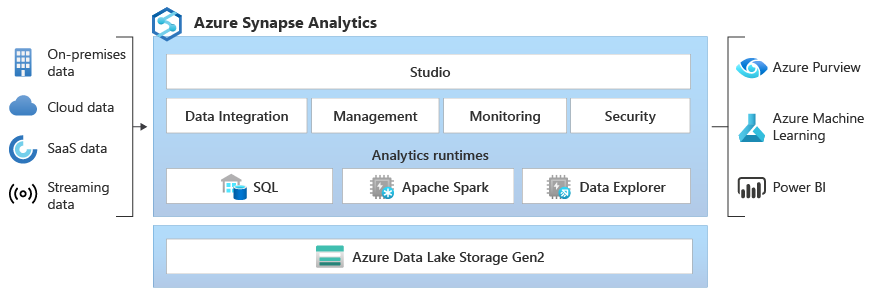
Azure Synapse Analytics launched in 2020 as Microsoft’s answer to unified analytics: a single workspace that combined data integration (Synapse Pipelines), SQL analytics (dedicated and serverless pools), and Apache Spark. It was a meaningful step forward from siloed Azure services, but it still required teams to stitch together multiple compute engines and storage layers manually.
Microsoft Fabric, generally available since November 2023, takes a fundamentally different approach. Rather than connecting services, Fabric unifies them under a shared SaaS layer built on OneLake, a single logical data lake that spans all workloads. Every Fabric experience, whether that’s Data Factory, Synapse Data Engineering, Data Science, Real-Time Analytics, or Power BI, reads and writes to the same OneLake storage without copying data between services.
The practical implication: Fabric is designed to eliminate the data movement and orchestration overhead that Synapse still requires between its internal services.
Architecture Comparison: OneLake vs Siloed Storage
This is the most consequential difference between the two platforms.
In Azure Synapse, your data lives in separate places depending on the workload. Dedicated SQL pools manage their own storage, separate from your Azure Data Lake Storage Gen2 account, separate from external Hive metastore tables. Getting data from a Spark notebook into a dedicated SQL pool requires explicit ETL steps. It’s manageable, but it creates friction and adds latency.
Microsoft Fabric centralizes everything in OneLake using the Delta Parquet format. A Delta table written by a Spark notebook in Data Engineering is immediately readable by a SQL analytics endpoint, a Power BI semantic model, or a Real-Time Analytics KQL database, without a pipeline in between. This isn’t just a convenience feature; it directly reduces data duplication costs and shortens the time from ingestion to insight.
For teams doing Microsoft Fabric Development, this architecture shift often means fewer pipelines to maintain, fewer storage copies to reconcile, and simpler lineage tracking across the platform.
Compute Model and Pricing
Azure Synapse and Microsoft Fabric price compute differently, and this has real budget implications.
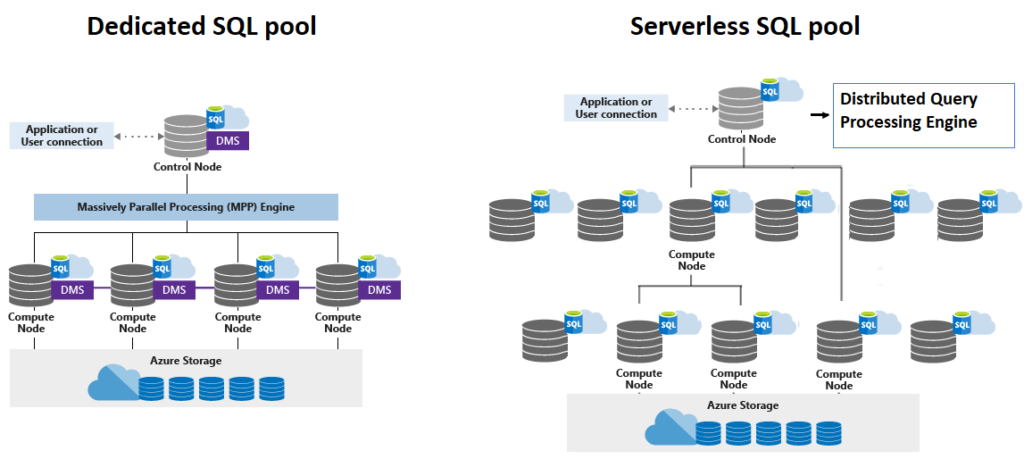
Azure Synapse uses a resource-based model:
- Dedicated SQL Pools bill by Data Warehouse Units (DWUs), running continuously unless paused manually
- Serverless SQL Pool bills per TB of data scanned
- Apache Spark Pools bill per vCore-hour while active
This model gives you granular control but also creates cost sprawl if teams leave dedicated pools running. It’s one of the most common issues Prism Analytics surfaces during Azure cost optimization engagements: dedicated SQL pools running at full DWU capacity 24/7 for workloads that only run during business hours.
Microsoft Fabric uses a capacity-based model through Fabric SKUs (F2 through F2048), purchased as reserved or pay-as-you-go capacity. All workloads running inside a Fabric workspace share the capacity, with built-in throttling and bursting. Power BI Premium capacity users will recognize the model immediately since Fabric grew out of the Premium licensing framework.
Key pricing difference to understand: Power BI Pro licenses do not grant access to Fabric workloads. You need at minimum an F64 capacity (or a Trial capacity for evaluation) to run Fabric experiences beyond Power BI report consumption. For organizations with existing Power BI Premium P-SKU capacity, Microsoft has mapped those SKUs to equivalent Fabric capacity, which softens the transition cost.
Feature Parity: What Synapse Has That Fabric Doesn’t (Yet)
Microsoft Fabric is not a full Synapse replacement today. A few areas where Synapse still holds advantages:
Dedicated SQL Pools. Fabric’s SQL analytics endpoint is serverless. If your workload depends on a dedicated pool with custom columnstore indexes and workload management groups, that capability does not exist natively in Fabric yet. Microsoft has signaled this is coming, but it’s not there as of early 2025.
Private Link and Network Isolation. Synapse has mature support for managed virtual networks and private endpoints. Fabric’s networking story is still evolving, which matters for industries with strict data residency and network isolation requirements.
Synapse Link for operational databases. Azure Synapse Link for Azure Cosmos DB and Azure SQL Database provides near-real-time analytical replication. Fabric does not have an equivalent feature for all sources yet.
For teams that rely heavily on any of these, a Synapse-to-Fabric migration today would be premature. A hybrid architecture, running Synapse for specific workloads while adopting Fabric for new development, is a realistic near-term approach.
Where Fabric Pulls Ahead
Outside of those gaps, Fabric’s advantages compound quickly for standard analytics workloads:
End-to-end integration with Power BI. Power BI is a first-class citizen inside Fabric, not an add-on. Semantic models, datamarts, and reports all sit inside the same workspace alongside pipelines and notebooks. This matters for BI teams doing Power BI Application Development since it removes the constant context-switching between Power BI Service and the Azure portal.
Copilot and AI integration. Microsoft’s Copilot features are being rolled out across Fabric first: Copilot in notebooks, Copilot in Dataflow Gen2, Copilot in Power BI. Synapse does not have a comparable AI assistance layer.
Simplified governance with Purview integration. Fabric workspaces integrate natively with Microsoft Purview for sensitivity labels, data lineage, and access policies, all governed through the same Entra ID tenant. Synapse requires more manual wiring to achieve comparable coverage.
Real-Time Intelligence (formerly Real-Time Analytics). Fabric’s KQL-based real-time analytics experience using Eventhouse and Eventstream is a more integrated and better-priced alternative to Azure Data Explorer for most streaming analytics use cases.
Which Platform Should You Build On?
The short answer: if you’re starting net-new analytics development today, build on Microsoft Fabric. The OneLake architecture, the Power BI integration, and Microsoft’s clear investment trajectory all point in that direction.
If you have existing Synapse infrastructure, don’t rush the migration. Evaluate which workloads can move to Fabric today (Spark-based data engineering, Power BI-connected workloads, real-time analytics) and which should stay on Synapse until Fabric’s feature gaps close (dedicated SQL pools, complex network isolation requirements).
Teams working with Prism Analytics on Azure data platform assessments often find that a phased approach works best: migrate greenfield workloads to Fabric immediately, then build a roadmap for legacy Synapse workloads based on feature availability and migration complexity.
Conclusion
Microsoft Fabric and Azure Synapse Analytics are not interchangeable. Fabric represents a genuine architectural shift toward a unified SaaS data platform, while Synapse remains the better fit for specific workloads that Fabric doesn’t fully cover yet. Understanding those boundaries, particularly around dedicated SQL pools, network isolation, and the capacity pricing model, is what separates a well-scoped migration plan from a costly misstep.
The direction Microsoft is heading is clear. The question is how fast your team can move there, and which workloads you move first.
Need a Power BI or Microsoft Fabric solution built right the first time? Prism Analytics delivers production-grade implementations for enterprise teams. Let’s talk about your Fabric adoption roadmap.