Table of Contents
Microsoft Fabric pricing confuses even experienced data architects. Unlike Power BI’s familiar per-user model or Azure Synapse’s resource-by-resource billing, Fabric introduces a unified capacity model that bundles compute across every workload — data engineering, warehousing, real-time analytics, and BI — into a single pool of Capacity Units (CUs). Get the sizing right and it is efficient. Get it wrong and you are significantly overpaying, or worse, throttling production workloads.
This post breaks down exactly how Fabric is priced, where the hidden costs live, and how to evaluate whether the investment makes sense for your organization.
How Microsoft Fabric Pricing Works: The F-SKU Model
Fabric capacity is sold in F-SKUs, measured in Capacity Units (CUs). CUs represent a pooled combination of CPU, memory, disk I/O, and network bandwidth. Every workload inside a Fabric workspace draws from that shared pool — notebooks, pipelines, Lakehouses, Warehouses, Power BI semantic models, and more.
The SKU range runs from F2 (2 CUs) up to F2048 (2,048 CUs), with each tier doubling compute capacity. For most enterprise buyers, the commercially relevant range sits between F32 and F256.
Key F-SKU price points (US West 2, pay-as-you-go):
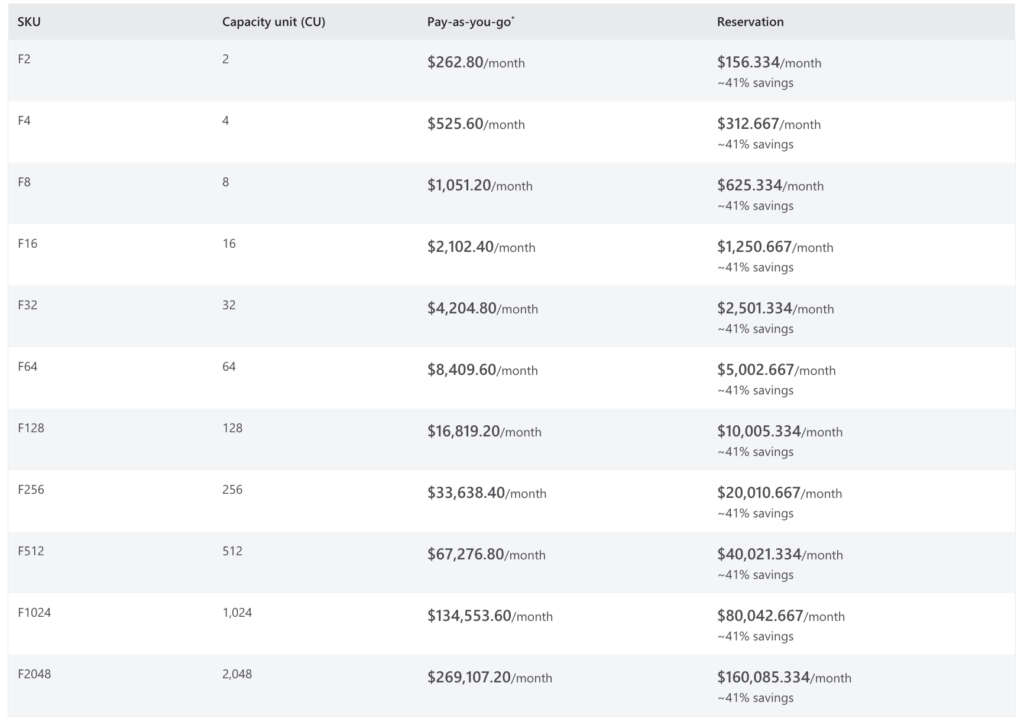
Prices vary by Azure region, typically by 10 to 15 percent. Enterprise Agreement customers can negotiate discounts off list prices. One-year capacity reservations also bring costs down meaningfully compared to pay-as-you-go rates.
The F-SKU model replaced the legacy Power BI Premium P-SKU model. Microsoft is actively retiring P-SKUs and directing all customers to F-SKUs. If your organization is still on P-SKUs, a transition plan should already be on your roadmap.
The F64 Threshold: Why It Changes Everything
The F64 SKU is not just a larger capacity tier. It is a licensing boundary that fundamentally changes your per-user cost structure.
On F-SKUs below F64, every user who needs to view Power BI content must hold a paid Power BI Pro license ($14/user/month) or Premium Per User (PPU) license ($24/user/month). On F64 or larger, users with a free Fabric license and a viewer role can access Power BI content without any paid per-user license. Report publishers and content creators still require Pro or PPU licenses regardless of SKU size.
This creates a real break-even calculation that organizations with large viewer populations need to run. Consider a straightforward example: an organization with 500 report consumers. At $14/user/month on Pro licenses, that is $7,000/month in per-user costs alone. At F64 ($8,400/month), viewers drop to free Fabric licenses while only the 30 to 50 content creators need Pro. The total cost can shift substantially — and in many cases, F64 is cheaper at scale than smaller SKUs plus per-user licensing.
The math does not always favor F64. For smaller teams with fewer viewers, an F32 plus Pro licenses may be more economical. The correct answer depends on your user split between creators and consumers.

OneLake Storage: The Cost That Gets Overlooked
Fabric capacity covers compute. Storage in OneLake is billed separately.
OneLake uses the same pricing structure as Azure Data Lake Storage Gen2, averaging around $23 per TB per month in baseline regions. For most analytics teams, this cost is relatively modest compared to compute. Where it becomes significant is in environments with large historical data sets, extensive data mirroring, or multiple copies of the same data created across workloads.
The common financial mistake here is mirroring data into OneLake without auditing what already exists. Fabric’s data mirroring feature makes it easy to replicate data from external sources into OneLake — which is useful, but also creates duplicate storage that accumulates cost quietly. Before you go live, map your expected data volumes and apply lifecycle management policies to cold data.

Procurement Options: Pay-As-You-Go vs. Reserved Capacity
Fabric offers two purchasing paths:
Pay-as-you-go via Azure: Billed per second with a one-minute minimum. You can pause and resume capacity, which means you only pay when workloads are running. This is genuinely useful for dev and test environments, or for batch-heavy workloads that run on schedules. The flexibility comes at the highest unit cost.
One-year reservations: Commit to 12 months in exchange for a meaningful discount off pay-as-you-go rates. Best suited for production environments with consistent usage. Requires forecasting your capacity needs accurately before committing.
For mature production environments, the reservation model almost always wins on total cost. For teams still evaluating Fabric or running intermittent workloads, pay-as-you-go preserves flexibility while you learn your actual consumption patterns.
Teams working with Prism Analytics on Microsoft Fabric implementations often start on pay-as-you-go to measure real CU consumption across their specific workload mix before locking in a reservation tier. The Fabric Capacity Metrics app — a Microsoft-published monitoring tool — is essential for this analysis. It gives a granular view of how each workload is consuming CUs over time, and it is the foundation for accurate sizing before any reservation commitment.
What Fabric Pricing Includes (and What It Doesn’t)
Understanding what sits inside the capacity cost prevents billing surprises post-launch.
Included in the F-SKU:
- Data Factory pipelines and Dataflows Gen2
- Spark-based Data Engineering workloads (Notebooks, Spark jobs)
- Data Warehousing (Warehouse and Lakehouse SQL analytics)
- Real-Time Intelligence (event streams, KQL Querysets)
- Power BI report rendering and model refresh
- Power BI Embedded (all F-SKUs include embedded capability, eliminating the need for separate A-SKUs)
- Copilot in Fabric (on supported SKU tiers, F64 and above typically required)
Not included / billed separately:
- OneLake storage (~$23/TB/month)
- Azure networking and egress charges
- External services integrated via pipelines (Azure SQL, Cosmos DB, etc.)
- Power BI Pro or PPU licenses for content creators and, on smaller SKUs, viewers
One important note on Dataflows Gen2 and Spark jobs: these workloads are “high-burn” consumers of CUs relative to passive workloads like report viewing. Organizations migrating complex ETL pipelines into Fabric often discover that CU consumption is dominated by data transformation jobs, not BI. Sizing based solely on report rendering needs leads to under-provisioned capacity for engineering workloads.
Is Microsoft Fabric Pricing Worth It?
For most organizations already invested in the Microsoft data stack, the answer is yes, with caveats.
Fabric’s capacity model is more efficient than running separate billing across Power BI Premium, Synapse Analytics, and Azure Data Factory. Consolidating those workloads onto a shared CU pool reduces idle spend, simplifies governance, and aligns cost with actual compute consumption rather than reserved SKU entitlements per service.
The value proposition strengthens significantly for organizations that:
- Have a large ratio of report viewers to content creators (F64 eliminates Pro licensing at scale)
- Are running active data engineering, warehousing, and BI on the same data — Fabric’s shared storage in OneLake eliminates redundant data copies between services
- Have already migrated or are planning to migrate from legacy BI platforms like WebFOCUS, where consolidating onto a modern unified platform reduces total platform sprawl
The caveats are real, though. Fabric is not cheaper by default for every workload. Organizations with primarily Power BI-only requirements, light data engineering needs, and a small user base may find that Power BI Pro licenses remain the most cost-effective option. And the complexity of the capacity model – CU consumption, burst behavior, throttling mechanics – requires deliberate monitoring and governance from day one.
Conclusion
Microsoft Fabric pricing is a capacity model that rewards organizations who use it broadly across their data stack. The F-SKU tiers are transparent once you understand the CU model, but the real work is in accurate sizing, understanding the F64 licensing boundary, and accounting for OneLake storage and high-burn workloads before you commit. Done right, Fabric can consolidate significant Microsoft data stack spend into a single, predictable cost center. Done carelessly, it generates the same billing surprises that plagued early Synapse and Premium deployments.
Need a Power BI or Microsoft Fabric solution built right the first time? Prism Analytics delivers production-grade Microsoft Fabric implementations for enterprise teams — from architecture and capacity sizing to full deployment. Let’s talk about your Fabric roadmap.